Zerodha, India's largest discount broker launched Kite, a super fast and super easy online trading platform in 2015. Kite by Zerodha is a flagship trading platform based on HTML5 technology, available in web and mobile app versions. Whether you are a beginner or an expert, Kite has almost every feature you need. The platform is free for all users and allows trading across multiple exchanges including BSE, NSE, and MCX.
Kite Zerodha has many powerful features, including advanced charts, live streaming of market data, multiple chart views, advanced orders, a clean and elegant user interface, and can even work with lower internet bandwidth. The platform combines speed and simplicity which make the Kite app one of the top-rated and best trading platforms in India.
Learn more about Zerodha Kite, including Kite app features, charges, how to add or withdraw money from Kite, types of charts available, and more.
Zerodha Kite Trading Platform Types
Kite 3.0 is an HTML 5 based online trading platform to trade in equity, derivatives, commodities, and currencies. The ultra-light, user-friendly, and multiple functionality-rich Kite platform is available in the browser-compatible website and mobile app versions.
Kite Web |
Kite web is a browser-compatible web trading platform that can be used across any browser such as Firefox, Chrome, Internet Explorer, etc. In 2017, Zerodha launched the latest version Kite 3.0 beta. kite.zerodha.com comes with features i.e. multiple order placement, a universal search bar, charting tool, live market data, and many more. |
Kite Mobile App |
The mobile app version of the Kite platform was first time launched in 2019. Kite app (Android and iOS) is one of the fastest and the most powerful trading app to trade at your fingertips. Intuitive dashboard, advanced charting, view positions & holdings, funds transfer, multiple market watchlists, etc. are the basic features of the Kite Mobile App. |
Kite Connect API |
Kite API is a set of HTTP/JSON API, any Zerodha client can get the API, change the coding, and create their own front-end full-fledged trading platform. |
Zerodha Kite 3.0 Web and Mobile App Features
Kite platform is one of India's best trading platforms due to its exceptional range of features like powerful charting, multiple market watchlists, hassle-free fund transfer, trade from the chart, and others. Here are the details;
Multilingual App
Kite is a multilingual app in over 10 different languages to enable users to access the platform in their local language.
Multiple Exchange Trading
The Kite platform allows online trading in equity, derivative, commodity, and currency segments at BSE, NSE, and MCX.
Universal Instrument Search
Kite has a single search bar to search different instruments whether stocks, equity F&O contracts, and commodity derivative contracts on MCX.
Multiple market Watchlists
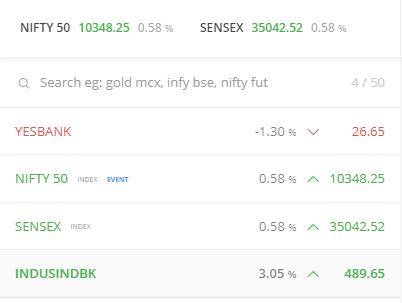
You can create upto 7 watchlists on Kite and add upto 100 scrips in each watchlist to track your favorite stock price movement.
Low Internet Bandwidth
Kite is able to work on very low internet bandwidth of even less than 0.5 kbps. It is especially a great feature for users in small towns with poor internet connectivity.
20 market depth and 3 level data
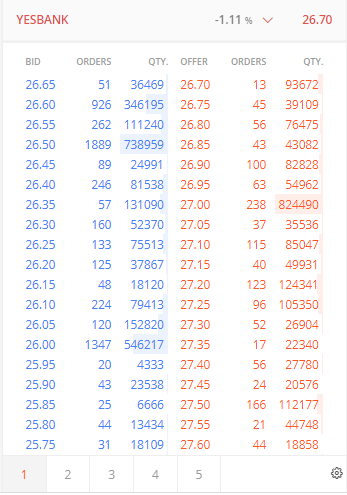
All the scrips added to the watchlists provides exclusive access to 3-level data (Orders, quantity, and price) for both the buy and sell offer with 20 market depth that is useful to check liquidity.
Advanced Charting
Kite offers the most powerful charting feature with 6 different types of charts, 100+ technical indicators, 20+ drawing tools, multiple chart view features, multiple chart timeframes, and others.
Zerodha Kite Fund Transfer
Zerodha Kite’s “Add Funds” Interface facilitates customers to add funds through various options like Unified Payment Interface (UPI), payment gateway (25+ banks), and IMPS/RTGS/NEFT.
Trade from the Chart
You can place orders directly through the chart and drags the order window up or down to set the order price. The feature is currently available on the Kite web platform.
Multiple Order Types:
Customers can place different types of orders i.e. MIS (Margin Intra-day square off), CNC (Cash N Carry), NRML, Stop loss, Stop loss-market, etc. They can also place advanced orders like After market order, Cover Order (CO), and Good Till Triggered (GTT) on Kite.
Sleek and Elegant user Interface
Zerodha Kite is an easy-to-use platform with intuitive dashboard and user-friendly interface.
Portfolio overview
Track your investment portfolio anytime under the “Holdings†tab. However, all intraday trades are visible in the “Positions†tab. You can also check order history including orders placed, orders executed, and pending orders.
Good-Till-Triggered Order
Zerodha allows customers to place GTT order. GTT is a special order to enable customers to set a trigger price for a stock, once the scrip reaches that level, then the limit order will be placed automatically on the exchange.
GTT order in Zerodha is free at no additional charges, and the order remains valid for 365 days or 1 year.
Keyboard Shortcuts
You can use ample of shortcut keys to access Kite features instantly by just pressing a key. The keyboard shortcuts are extremely useful to place instant buy and sell orders, access charts, etc.
Zerodha Kite Platform Charges
Nil, Kite is an absolutely free trading platform by Zerodha that is available at zero charges. Customers can access the Kite Web and the mobile app on Android and iOS devices for free at 0 fees.
Zerodha Kite Mobile App Charting
- 6 types of charts: Point & Figure chart, Heiken Ashi, Kagi, Linebreak, Range Bars, and Renko.
- 100+ technical indicators and 20+ drawing tools for technical analysis.
- A multi-view charting feature to view upto 8 charts on Tradingview on a single screen.
- Multiple chart timeframe from 1 Min to 30 Min, 1 hour, 2 hour, 3 hour, 1 day, or 1 week.
- Track stock price history since 2008.
- Comparison of scrips – On Kite to compare the visual charts of various scrips to track their performance.
- TradingView and Chart IQ technical charting libraries.
- Trade directly from chart.
Zerodha Kite Fund Transfer
You can add or transfer funds to the Zerodha trading account using multiple modes be it UPI or Net Banking. UPI is the free method to add money instantly to your Zerodha account.
How to add funds on Kite App through UPI?
- Login to your Zerodha account on the app or web.
- Go to “Funds” tab and tap on the “Add Funds” option.
- Select UPI mode, enter the amount you wish to add, and enter your virtual UPI ID.
- Accept the payment mandate request on your UPI app.
- The funds will be instantly reflected to your Zerodha balance.
Know more about Zerodha Fund Transfer Review >>> Click Here
Zerodha Kite Order Types
Zerodha offers both intraday (MIS) as well as delivery (CNC) trading, and a client can place various types of orders under both segments. Here are the Kite product and order types explained;

| Products/Orders | Description |
|---|---|
| MIS Order | You can start intraday trading by placing an MIS (Margin intraday square-off) order, in which, you must close your positions the same trading session, and otherwise, Zerodha itself close your position at intraday square off charges of Rs. 50 + GST. |
| CNC Order | CNC orders are used for delivery trading hence, require 100% margin upfront in your trading account. Stocks bought on CNC will be transferred to your Demat account as per the T+2 period. Zerodha offers free equity delivery trading at zero brokerage. |
| Market order | Buy or sell order placed at the prevailing market price of a scrip. |
| Limit order | Buy or sell orders that are placed at a specific target price are called limit orders. |
| Stop loss order (SL) | A stop-loss is a limit order to stop losses whenever the stock price level reaches a certain level, then the order will be placed at the specified price automatically on the exchange. |
| Stop-loss market (SL-M) | This type of order is placed at the market price at the exchange, once the stock reaches the trigger price. |
| Regular (NRML) | These are normal F&O orders that are held until the expiry period. |
Zerodha Kite User Manual
Zerodha provides a Kite user manual to enable users to examine how to access different features on Kite.
- Login into the Kite platform.
- Click on client ID and go to the “User Manual” option.
- Here, is the complete Kite user manual available that explains its key features i.e. Market watch, fund transfer, orders placement, portfolio, charting, etc.
Zerodha Kite Pros and Cons
| Pros/Advantages | Cons/Disadvantages |
|---|---|
Zerodha Kite Review: Final thoughts
Kite is a modern, sleek, and feature-loaded web and app-based platform. It has all the necessary features for both beginners and professional traders.
Simplicity, ease of use, intuitive dashboard, hassle-free money transfer and one-tap order placement are the features for investors. Multiple types of charts, trading directly from the chart, hundreds of technical indicators, and drawing tools are some of the interesting features for traders to perform technical analysis. All these features provide an effortless trading and investing experience for everyone.