Guest User
Welcome! Please login.
Zerodha offers online trading and investment in equity, derivative, commodity, and currency segment. Anyone having Zerodha Demat and trading account can trade at a flat brokerage fee of Rs. 20 per order across segments, however, delivery trading is free. Moreover, the Zerodha coin platform allows free direct mutual fund investment at zero commission or brokerage. The discount broker offers various advanced orders like GTT orders, aftermarket orders, and others. Check here the complete details of Zerodha product and services offerings including trading & investment products, order types, and more.
Zerodha is a registered DP with CDSL to offer Zerodha Demat Account to its clients so that they can keep shares, securities, and mutual funds in dematerialized form.
| Zerodha Demat Account Opening Fee | Free |
| Zerodha Demat Account AMC | Rs. 300 |
Note: Zerodha Demat AMC of Rs. 300 per annum is charged on a quarterly basis i.e. Rs. 75+GST.
Zerodha Equity Trading Account is used to trade in equity, futures & options, and currency segments. To trade in Zerodha, clients just need to log in with their Zerodha account on Kite web or Kite mobile app and then start online trading across segments.
| Zerodha Trading Account Opening Charges | Free |
| Zerodha Trading Account AMC | Free |
Open Zerodha Demat and Trading Account
Zerodha allows commodity trading on MCX through opening a Zerodha commodity trading account. Existing customers can simply activate the commodity segment to start trading on MCX, however, new users can open Demat + equity + commodity trading accounts. You cannot only open a commodity account in Zerodha.
| Zerodha Commodity Trading Account opening fee [Online] | Free (₹0) |
| Zerodha Commodity Trading Account opening fee [Offline] | Free (₹0) |
| Zerodha Commodity Trading Account AMC | Nil |
| Zerodha Commodity Trading Brokerage | Rs. 20 per order or 0.03%, whichever is lower |
Know more on commodity trading with Zerodha
Zerodha coin is the free mutual fund investment platform at zero commission, brokerage, or subscription fee. If you have a Zerodha 2-in-1 account then you can access the coin platform on Kite and buy and sell thousands of direct mutual funds for free.
NRI can open accounts in Zerodha including NRI Demat + Trading account and trade-in equity delivery, and futures & options segment. Zerodha supports NRI account opening facility through NRE or NRO bank account with IndusInd, Axis, HDFC, and IDFC First Bank.
| NRI Equity delivery brokerage | Rs. 200 per order or 0.1% whichever is lower |
| NRI Equity Futures trading | Rs. 100 per executed order |
| NRI Equity Options trading | Rs. 100 per executed order |
Equity trading account in Zerodha facilitates intraday as well as delivery trading on the BSE and NSE. Zerodha allows intraday trading at a max of Rs. 20 per order and offers free delivery trading at zero brokerage.
Derivative trading is all about trading in equity futures and options contracts. Residents, as well as NRIs, can trade-in equity derivative segment on Kite web and Kite by Zerodha mobile app.
Zerodha has four currency pairs USD-INR, EUR-INR, GBP-INR, and JPY-INR. The broker allows currency futures & options trading at a flat Rs. 20 per order or 0.01% whichever is lower. Only residents can trade in currency with Zerodha account, however, currency trading is not allowed to NRI. Zerodha allows trading in four currency pairs
Residents and NRIs can apply for IPO online using UPI through console back-office on the Kite platform. As the broker allows free delivery trading, therefore, online IPO investment in Zerodha is Free. You can also use Zerodha Demat account details to purchase IPO through ASBA/ net-banking (without UPI) process.
Zerodha offers a margin trading facility to customers. The margin facility is available on equity intraday, derivative, commodity, and currency segments. Margin facility enables customers to trade without having the required funds in their Zerodha account.
One can place the following types of orders through the Zerodha account on Kite.
| CNC order | The order is used to trade-in delivery segment when positions are held for more than a day. |
| MIS order | You can place an MIS order for intraday trading when positions are settled same trading day. |
| Market order | When a buy or sell order is placed at market price. |
| Limit order | When a buy or sell order is placed at a particular price. |
| Stop loss order | Customers can place SL order (price + trigger price) on Kite to limit their losses. |
| SL-Market order | This is a stop-loss order placed at a market price, when the trigger price is met. |
| Cover order (CO) | It is a buy or sell order (market or limit) that is placed with a compulsory stop-loss order. |
Zerodha allows aftermarket order (AMO) facility to its clients, through which, customers can place buy or sell orders even after the market hours.
In July 2019, Zerodha has introduced GTT (Good Till Triggered) order at zero charges. GTT order allows you to automatically place a limit order when the stock reaches the trigger price level. Investors who don’t track the market regularly can place GTT order on Kite. GTT order can only be placed in CNC segment and will remain active for 365 days.
Smallcase is about investing in ideas or themes through selecting a number of stocks from that particular sector. You can invest in a maximum of 50 stocks or ETF with Zerodha smallcase. The broker charges Rs. 100 fee on investing with smallcase.
Customers can trade in Zerodha through call & trade services. They simply need to call the support desk at 91-8047181888 and tell your trading requirement and the customer service team will place an order on your behalf.
Refer Zerodha account to your friends and family members and get a referral commission or bonus. Zerodha provides Rs. 300 reward points and 10% of the brokerage benefits on each referral.
This is a very basic question asked by many users. To apply in the buyback, you must have holding of scripts on the record date. If you wish, you can sell your script (optional) after the buyback record date and buy it again just before the buyback opens and tender your shares for a buyback. Usually, there are 1 to 2 months of processing time between the record date and buyback close date. So you don’t need to block your money for 2 months in case you are a retail trader.
Before buyback window opens, Registrar sends Letter of Offer and Tender Form (“personalized Form of Acceptance-cum-Acknowledgement”) via email or in a physical format at your registered address. The Letter of Offer and Tender Form are being sent to you as a registered equity shareholder of the Company as on the Record Date.
Now answering the question- how to apply/participate in buyback with Zerodha:
Brokerage firms like ICICIDirect, HDFC Securities has an option in IPO Section, where you can tender your holdings in buyback online. Zerodha also providing online option for tendering your buyback scripts on your convenience. You can do buyback tender of shares with Zerodha online in a less than 30 second.
1: Login to console.zerodha.com with your Kite login ID.
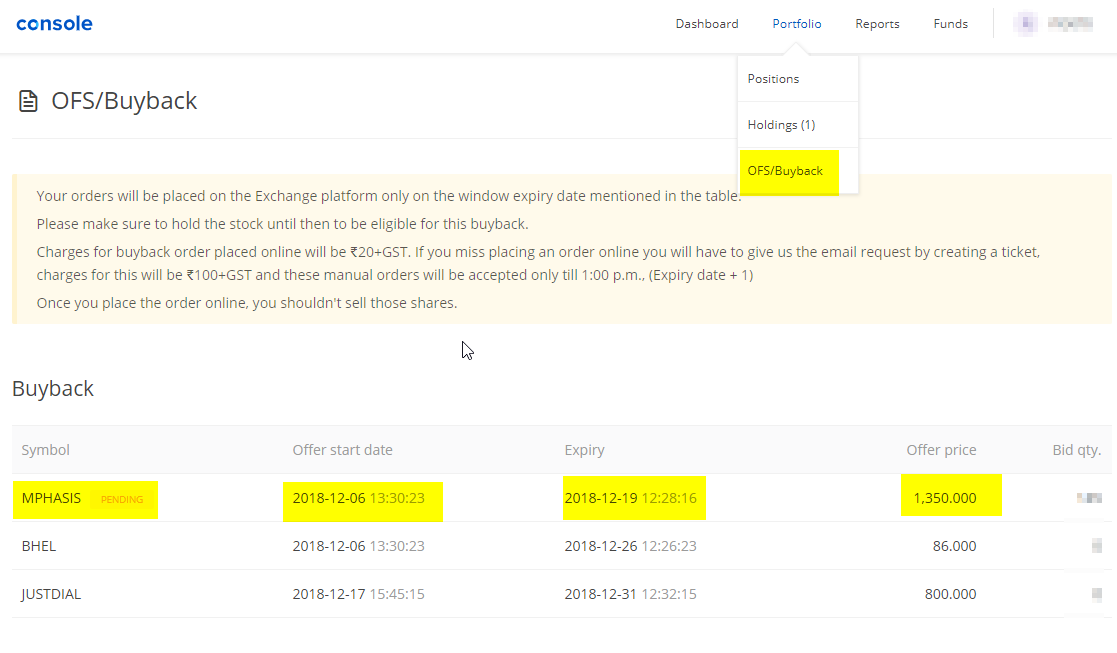
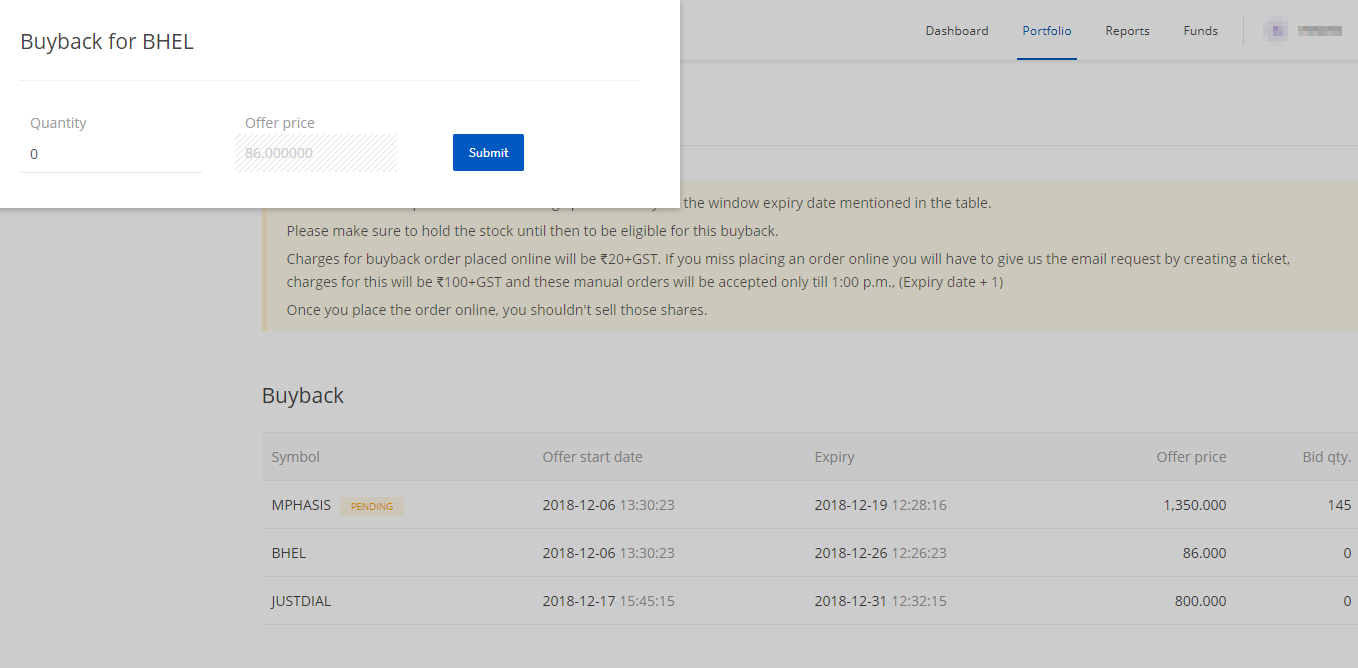
2:Send an email to [email protected] with the following detail – (Option Closing on 20th Dec 2018), After that no more manual orders will be accepted.
3:Fill Physical Tender Form and submit to your nearest branch office or courier to Zerodha Sales office. – Not applicable, as Zerodha has provided a online submission process.
The broker will consolidate all Buyback request and send to exchange on a regular interval. When you are applying for the buyback, you must have held of scripts in your demat account. You need to plan in advance if you have sold the script after the record date.
We personally suggest to tender all equity shares (complete holding of the script as of Record Date) since the actual acceptance ratio can be higher from proposed acceptance ratio in Tender Form.
For example – Record date for XYZ share buyback is Jan 30, 2017. So one must have stocks in demat account on or before 30th Jan 2017. For that, you need to buy a script by 28th Jan 2017 considering there are no settlement holidays. Usually, there are T+ 2 days of settlement window, so you must have plan accordingly.
Once you have holding on the record date, to declare buyback open and end date this process takes 4 to 6 week and you will get 2 weeks of buyback window, so after 30th Jan 2018 you can sell your scripts (optional) in case you don’t want to lock your money for approx 2 months. Once buyback window dates announce you can again accumulate the shares and apply for buyback.
Assume XYZ Company announces buyback open and close date as 10th March 2017 to 25th March 2017. You can apply in buyback in this window any time by sending an email to Zerodha support team.
This is a very basic question asked by many users. To apply for the buyback, you must have holding of scripts on the record date. If you wish, you can sell your script (optional) after the buyback record date and buy it again just before the buyback opens to tender your shares for a buyback. Usually, there are 1 to 2 months of processing time between the record date and the buyback close date. So you don’t need to block your money for 2 months in case you are a retail trader.
Before the buyback window opens, the Registrar sends a Letter of Offer and Tender Form (“personalized Form of Acceptance-cum-Acknowledgement”) via email or in a physical format to your registered address. The Letter of Offer and Tender Form are sent to you as a registered equity shareholder of the Company as on the Record Date.
Now answering the question—how to apply/participate in buyback with Zerodha:
Send an email to [email protected] with the following details:
Note: Email orders must be submitted before the closing date. For example, if the option closes on December 20, 2018, no manual orders will be accepted after that.
Not applicable: Zerodha has provided an online submission process, so there is no need for physical tender forms or couriering them to Zerodha offices.
The broker consolidates all Buyback requests and sends them to the exchange at regular intervals. When applying for the buyback, you must have held the scripts in your demat account on the record date. Plan in advance if you have sold the script after the record date.
We personally suggest tendering all equity shares (complete holding of the script as of Record Date) since the actual acceptance ratio can be higher than the proposed acceptance ratio in the Tender Form.
Record Date: January 30, 2017
After holding the shares on the record date, the process to declare the buyback's open and close date typically takes 4 to 6 weeks. The buyback window lasts about 2 weeks. After January 30, 2018, you can sell your scripts (optional) if you don’t want to lock your money for approximately 2 months. Once the buyback window dates are announced, you can repurchase the shares and apply for the buyback.
Example: XYZ Company announces the buyback open and close date as March 10, 2017, to March 25, 2017. You can apply for the buyback during this window by submitting an email to the Zerodha support team.
The validity type “Day” allows for keeping the order active until 3.30 p.m.(Market closing time). If the order does not get a match until the close of the market, gets auto-cancelled.
“IOC” order helps and allows you to execute the order instantly, as soon as it goes to the exchange. Failing the instant execution the order will automatically be canceled by the system.
One person can have one individual Demat account in his name with Zerodha. But if you want to open a joint account then it is possible to have a joint Demat account along with an individual Demat account with the same person’s name.
But one trading account can be allotted to a single person. Either you can have your trading account linked to your individual account or you can have your trading account linked to your Joint Demat account.
As per SEBI’s rule when you sell your shares from holding, you receive 80% that day and 20% the next day morning. The 20% of the sold value which is blocked gets reflected in your delivery margin section on the fund's page.
The delivery Margin also includes the extra margin blocked for your open stock futures and options, which are to be settled physically on the expiry day. The exchange starts blocking the extra margin for stock FNOs 4 days before the expiry.
Stock Split is a corporate action, in which companies increase the number of outstanding shares by splitting the face value of the share. The investment value before and after the split remains the same, the price reduces, and the number of shares increases. It is usually done to increase retail participation in the stock.
The split shares might take 2-3 days to be shown in your kite holding after it gets listed on the exchange.
Ex - If there is a split at 1:2 and you had 100 shares of ABC at a price of Rs 500, then after the split, the total shares would be 200 and the new price will be Rs 250.
Zerodha doesn’t provide any tax filling services directly, however, it has partnered with Quicko - an online, tax planning, preparation, and filing platform. It helps its traders for filing taxes.
Alternatively, you can take Zerodha’s Tax Pnl Report and file the taxes with any of your tax consultants. Zerodha provides the Tax Pnl Report, which contains all the transactions and capital gains during any financial year.
You can download the same from the console.
Zerodha’s NBFC arm, Zerodha Capital provides Loans Against Securities (LAS). In the LAS facility, you can pledge stocks and mutual funds and get a loan against them.
The minimum loan disbursal amount is Rs 25,000 and a flat interest of 10.5% is charged by Zerodha NBFC.
If you are a Zerodha customer the loan is disbursed within 48 working hours after the online application is over.
You have to visit https://zerodhacapital.com/ to apply for a loan against securities.
The POA (Power of attorney) gives the right to the broker to debit shares on your behalf out of your holding.
If you don’t submit the POA, you have to do the CDSL Authorisation(online) of your holdings, on the day you sell your shares. You have to enter the CDSL TPIN to authorize the sell transaction.
You can send the physical POA to Zerodha’s head office to avoid the authorization process. To download the POA application form visit this link.
While placing the order through Kite, you might come across the term Validity in the order window. The term Validity means how much time your order will stay valid, completion of which it gets auto-cancelled.
“IOC” order helps and allows you to execute the order instantly, as soon as it goes to the exchange. Failing the instant execution the order will automatically be canceled by the system.
The validity type “Day” allows for keeping the order active until 3.30 p.m.(Market closing time). If the order does not get a match until the close of the market, gets auto-cancelled similar to an IOC order.
For offline Nominee addition, the nomination form is needed. The nomination form can be downloaded from Zerodha’s official website. To do so follow the steps mentioned below.
The “Used margin” in the fund's section shows, the net margin utilized by the client. It can contain
The used margin can be both positive and negative. If the “Used margin” is positive then that means you have utilized that much amount in total that day. If the “used margin” is negative that means you might have received some funds after squaring your holdings.
“LearnApp” is a stock market education platform, partnered with Zerodha for imparting financial education at a cheap price.
LearnApp was VC funded by Zerodha in 2018. It provides online stock market trading, investing, and business-related classes from industry experts at a very cheap price.
Trigger price is the price entered by a trader while placing a stop-loss limit and stop-loss market orders. Once the stock reaches the trigger price level, the buy or sell order will automatically send to the exchange.
Trigger price in Zerodha Stop-loss order
To place a stop-loss order, select “SL” in the order window, enter trigger price and enter the price at which you want to execute the trade.

Trigger price in Zerodha Stop loss market (SL-M) order
To place trigger price in Zerodha SL-M order, select SL-M and enter the trigger price, once the stock will reach the mentioned price level, then the order will execute at the prevailing market price.
Trigger price can also be entered for the bracket order and cover order with Zerodha.