
In March 2018, Zerodha launched a Unified Payment Interface (UPI) enabled fund transfer facility. It is the most convenient method to add money from the linked bank account to the Zerodha trading account instantly. The discount broker allows free UPI-based fund transfer up to the daily limit of Rs. 1 lakh at zero charges. Check out Zerodha UPI fund transfer process, features, charges, limit, and more.
Zerodha UPI ID
-
UPI is an instant payment mechanism developed by the National Payment Corporation of India (NPCI) that allows users to instantly transfer funds between two parties bank accounts. Zerodha customers can create a UPI ID on any BHIM UPI app and add funds to their Zerodha account using the linked bank account. Google Pay, Phone Pe, etc. UPI ID can be used to add funds to the Zerodha trading account.
Zerodha UPI Fund Transfer Features
- Funds are transferred instantly using UPI.
- Zero-cost fund transfer through UPI.
- Real-time fund transfer.
- Apply IPO online with Zerodha using UPI for free.
- Customers can transfer upto Rs. 1 lakh per day to the Zerodha account.
- The UPI facility is available on the Kite web as well as Kite mobile app.
How to add funds to Zerodha using UPI?
To add money using UPI, all you need to have is a registered UPI ID that must be linked with the same mapped bank account in your trading account. Zerodha Kite (web and mobile app) platform allows UPI-enabled fund transfers (Deposit and withdrawal).
You can use any UPI like PhonePe, Paytm, Google Pay, etc. to transfer money to your Zerodha account.
Steps to add funds in Zerodha through UPI:
- Login to the Zerodha Kite.
- Click on the “Funds” tab and tap on the “Add Funds” option.
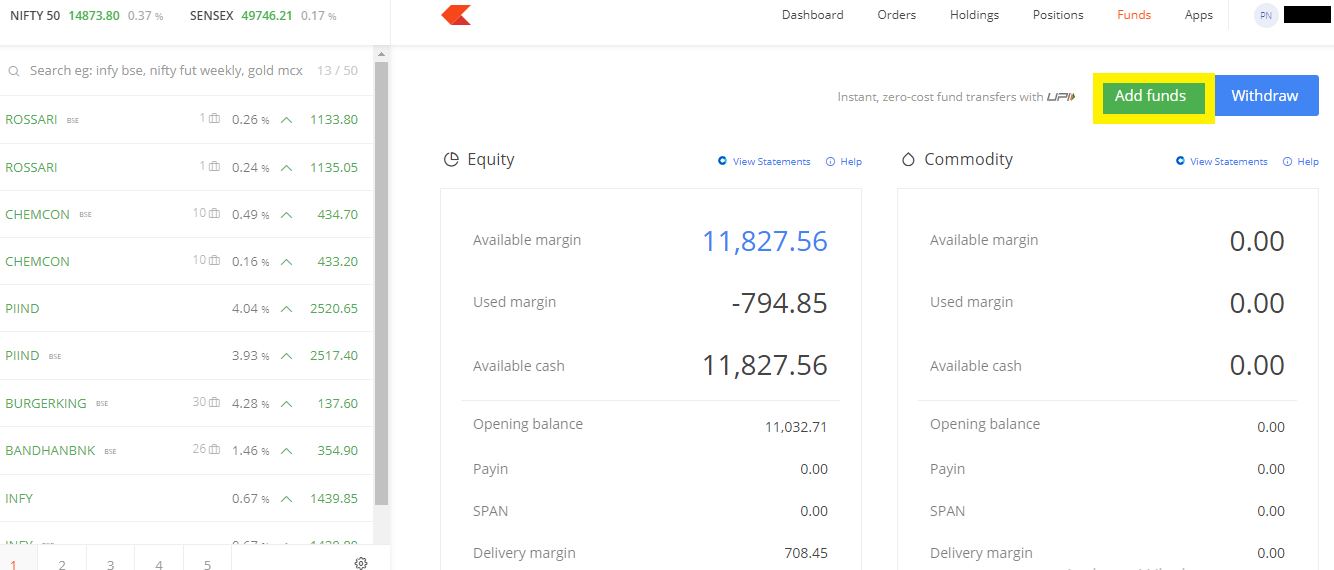
- Once clicked, a new window will open. Select UPI as a payment mode and enter amount, segment (Equity/Derivatives/Currency or Commodity), bank account, and UPI ID.
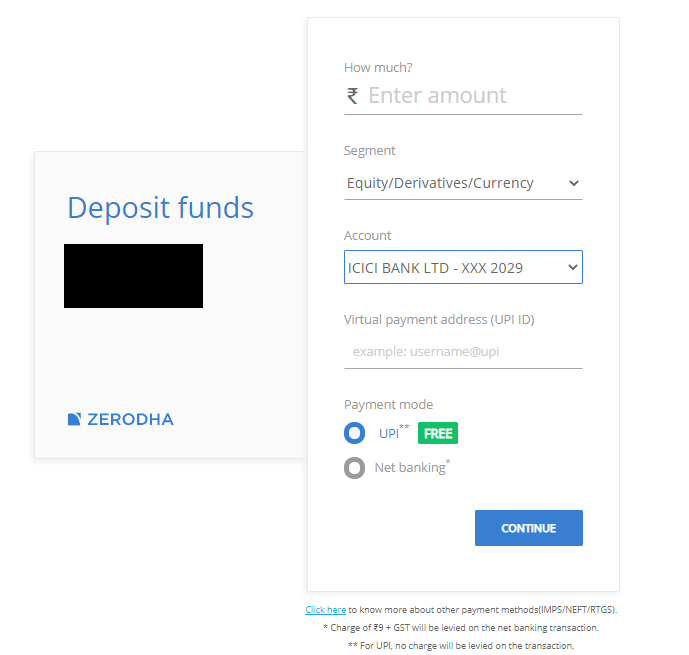
- Make sure that the UPI is linked to the registered bank account with your trading account. Once details are entered, press the “Continue” button.
- Notification of payment collect request will be sent to the provided UPI address. Check the UPI app and enter the UPI PIN to accept the payment request.
- Once done, the Zerodha payment page will display a confirmation message that the funds are transferred successfully to your account.

Zerodha UPI Fund Transfer Charges
-
Free, yes, you heard it right, adding funds to the Zerodha trading account using UPI is free for all clients as they are not charged any brokerage fee. UPI transfers funds instantly and it immediately reflects into your Zerodha account.
Zerodha UPI Fund Transfer Limit
-
The fund transfer limit through UPI is Rs. 1 Lakh means customers can transfer a maximum of Rs. 1 lakh per day. However, one can add a maximum of Rs. 25000 for each transaction.