In July 2019, Zerodha introduced a special order called GTT (Good-Till-Triggered). GTT order in Zerodha allows users to execute share buy or sell orders at a specific price. Since GTT orders have a long-term validity of 1 year, it is a great feature for passive investors as they do not require you to follow the market every day. Zerodha users can simply place a GTT order and once the stock reaches the target price, your order will be automatically placed on the exchange.
You may have more questions about GTT, such as whether Zerodha charges for the GTT order, what segments are available, how to place a GTT order on the kite web or mobile app, and more.
Let us dive deeper to get a full understanding of Zerodha GTT Order in detail.
What is Good Till Triggered GTT Order
As the name suggests, a GTT order by Zerodha allows you to set a trigger price, and once the stock reaches the trigger price at any time in the future, a limit order is placed on the exchange.
GTT orders can only be placed in the equity cash segment of the NSE and BSE. You can create GTT on Kite using the CNC (Cash N Carry) product type and NRML order type in the equity derivatives segment on the NSE.
For example, if you want to buy 50 Wipro shares at a price of Rs 420, you will typically monitor the Wipro share price daily and place a buy order when the desired price level is reached. But instead of tracking the Wipro share price performance every day, you can also place a GTT order. When the Wipro share price reaches the specified price target, a limit order is placed at the specified price level.
GTT Vs GTC
GTC stands for "Good till cancelled" order. Zerodha does not offer GTC orders as exchanges in India do not support GTC orders. The reason is that GTC orders are canceled at the end of each trading day. In such a case, the stock broker has to place all GTC orders again on the next trading day.
For this reason, Zerodha has introduced the GTT order as an alternative to the GTC order, where you select a single or OCO trigger price for the placement and execution of buy and sell trades.
How to place GTT Order in Zerodha Kite?
The GTT order feature is available on both the Kite mobile app and the web platform. Follow these steps to create or place a GTT order on Kite Zerodha;
Zerodha GTT Buy order
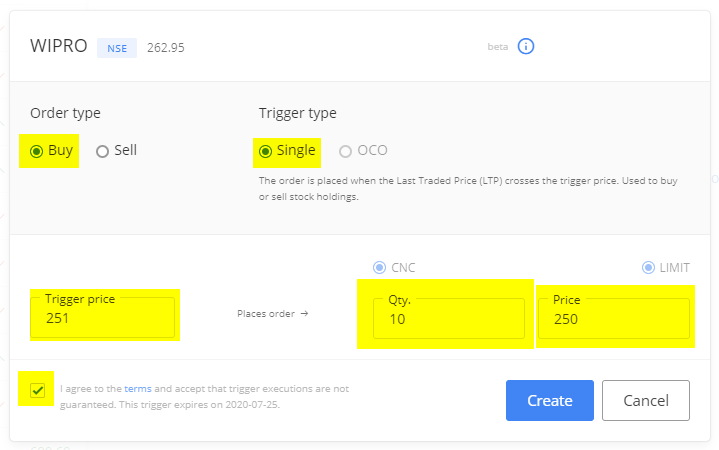
To place Zerodha GTT buy order, you need to select the trigger type as ‘single’. Place a trigger price where your order will get a trigger means the order will be placed to the exchange. This price should be higher or equal to your buying price.
For example, you want to place a buy order for Wipro and the current market price of Wipro is 263. You want to place your GTT order when Wipro comes at 250 and want to buy 10 scripts. In such a case, you can place trigger price @251, qty @10, and price @250.
Zerodha GTT Sell order
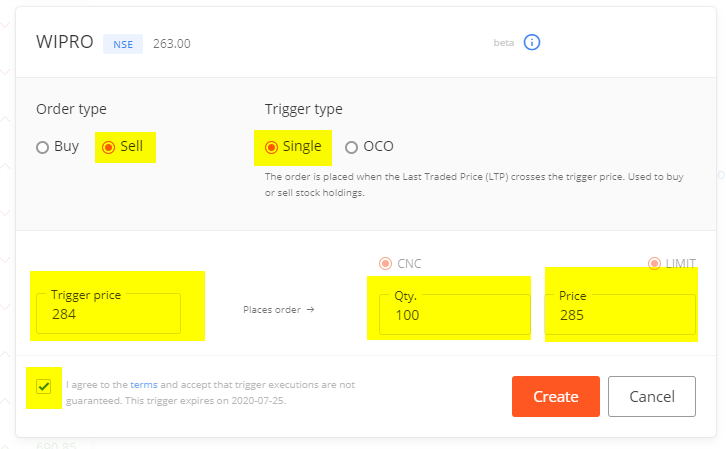
To place a GTT sell order, one needs to select the trigger type as ‘single’. Enter a trigger price and limit price where you want to execute the order. In the case of sell, the trigger price must be lower or equal to the limit price.
For example, you have 100 Wirpo shares in your holding and you want to create a GTT order.
CMP of Wipro is 263, you wish to sell your holding of Wipro @285. Your order should have trigger price @284, quantity @100, and limit price @285. When the Wipro share price reaches 284, Zerodha submits your limit order to sell your 100 shares @285.
Zerodha GTT OCO One Cancel Others Order
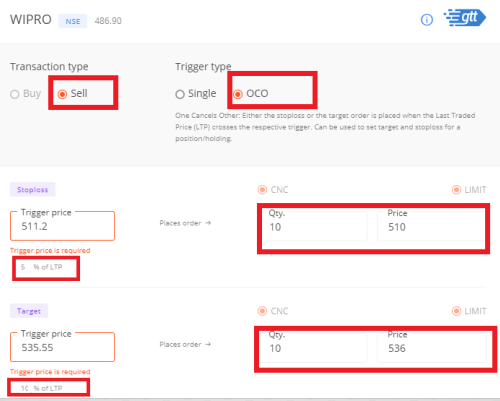
GTT One Cancel Others is an advanced version of the GTT order where you place a limit order along with a target order and a stop loss order. As soon as the stock reaches the specified trigger price, one of the two limit orders is executed, while the other order is automatically canceled. This order is great for booking profits by executing a sell order at a target price and also for limiting losses on your trades if the market reacts in the opposite way.
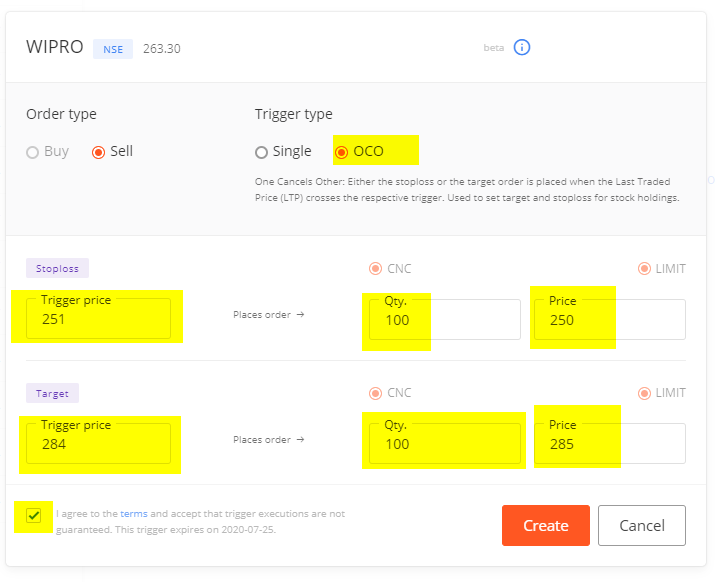
For example, you want to sell 100 Wipro share @285, CMP is 263, you want to exit Wipro if it goes below 250. So in such a case, you can select trigger type as OCO. Now you have to fill Stop loss trigger Price @251, qty@100, and limit prices @250. The second trigger is for the target with trigger prices @284, qty @100, and limit prices @285.
What will happen in this scenario, if the market moves up, the possibility is your target trigger will get execute. If the market moves down, the possibility is your stop-loss trigger will get execute. When anyone trigger is executed, it automatically cancels the other trigger. That’s why it is called OCO - "One Cancels Others" order.
Zerodha GTT charges
There are no additional charges to place a GTT order with Zerodha. The broker offers the GTT feature absolutely free of charge. You only pay the applicable brokerage fee when your order is executed.
For example, if you placed a GTT sell order, DP fees will apply. However, since zerodha offers brokerage-free delivery trading, you will not be charged any brokerage fees for GTT buy orders in the equity cash segment.
Apart from the brokerage fee, you will have to pay the stock exchange turnover tax, STT, SEBI charges, and GST.
Zerodha GTT Order validity
All GTT orders are valid for a period of 365 days or one year. If the share price exceeds the specified trigger price within the specified period, the order GTT is placed and executed. However, if the stock does not meet the specified price criteria, the GTT order will be automatically cancelled and you will need to recreate GTT.
If the stock price reaches the trigger level and the GTT order is placed at a limit price but is not executed on the same day, then this order will also become inactive or cancelled. Since the trigger order GTT is valid only once, in such a case the user must place the order again on the next trading day.
Zerodha GTT Pros and Cons
| Pros/Advantages | Cons/Disadvantages |
|---|---|
|
|
Zerodha GTT Order Review: Closing Thoughts
If you are not an active trader who does not keep an eye on the market on a daily basis, GTT is a great feature for you to place stock buy and sell limit orders for a year. Passive investors who have set a profit target for their portfolio can also use the GTT OCO order type to automatically sell their portfolio holdings at the target price while limiting losses with a stop-loss order.